
Table of Contents
- What does an AI edge box actually do?
- How an AI edge box works, step by step
- AI edge box vs cloud AI vs smart cameras
- The specifications that matter when you compare AI edge boxes
- Common AI edge box chip platforms
- AI edge box use cases in people counting and beyond
- How to choose an AI edge box: a checklist
- Installation and deployment tips
- Where Pyroglaux fits
- Frequently Asked Questions
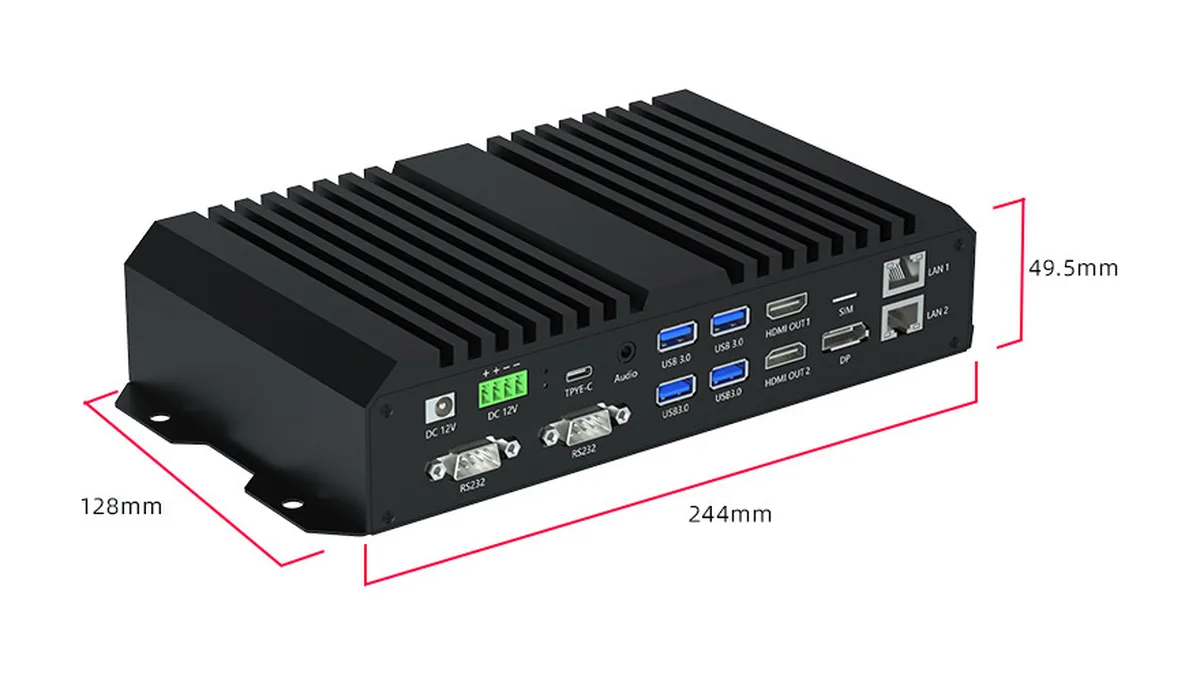
An AI edge box is a small, fanless computer with a neural processing unit (NPU) that sits on site, next to your cameras, and runs video AI locally. The box takes video streams from existing IP cameras, detects and tracks people or objects in real time, and sends only the results, such as counts, alarms and occupancy, to your dashboard or business system. Raw video never has to leave the building.
AI edge boxes are sometimes called edge AI boxes, edge computing boxes, AI NVRs or video analytics appliances. The names differ, but the idea is the same: move the heavy computer vision work from the cloud to the edge of the network. This guide explains how an AI edge box works, compares it with cloud AI and smart cameras, lists the specifications that matter, and walks through how to choose one, with a focus on people counting and footfall analytics.
What does an AI edge box actually do?
An AI edge box turns video into structured data. A camera on its own produces pixels. An AI edge box reads those pixels and answers questions such as how many people entered the store in the last hour, how long the checkout queue is, or whether anyone is standing in a restricted zone.
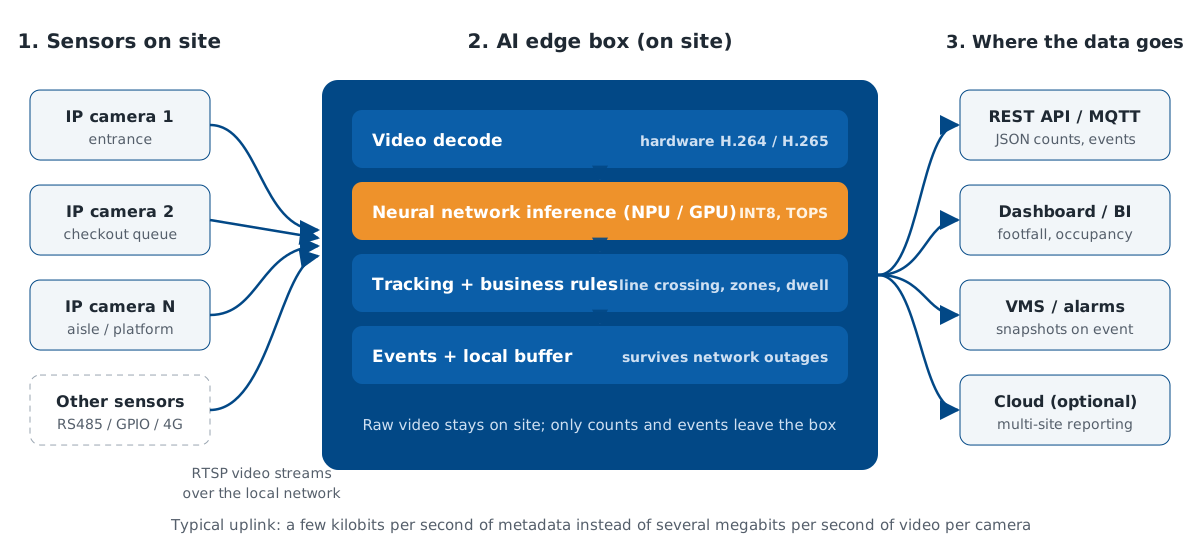
Inside the box, four jobs run continuously:
- Video decoding. The box pulls H.264 or H.265 streams from IP cameras, usually over RTSP, and decodes them in dedicated hardware.
- Inference. A neural network, for example a head or person detector, runs on the NPU or GPU and finds objects in each frame.
- Tracking and rules. Tracking software follows each detected person between frames, and business rules turn movement into events: crossing an entrance line, entering a zone, waiting longer than a set time.
- Output. The box sends events and aggregated counts to a REST API, an MQTT broker, a video management system or a cloud platform, and keeps a local buffer for network outages.
How an AI edge box works, step by step
Step 1: Cameras stream video to the box
Most AI edge boxes work with standard ONVIF or RTSP IP cameras, so existing CCTV cameras can often be reused. The box and the cameras sit on the same local network, typically connected through a PoE switch. Some boxes also accept sensor inputs over RS485, GPIO or USB, which helps when counting data needs to be combined with door contacts or environmental sensors.
Step 2: Hardware decoders unpack the streams
Decoding video is expensive. A good AI edge box has a hardware video engine that decodes many 1080p streams in parallel without loading the CPU. Decoding capacity, not AI performance, is often the first limit you hit when you add cameras, so check the number of simultaneous 1080p streams the box can decode at the frame rate you need.
Step 3: The NPU runs the AI model
The neural processing unit is the part that makes an AI edge box different from an ordinary industrial PC. NPUs are designed for the matrix maths in neural networks and run quantized INT8 models efficiently at a few watts to a few tens of watts. Vendors rate them in TOPS, trillions of operations per second. For counting, the model rarely needs to analyze every frame at full resolution: 5 to 15 frames per second at a reduced input size is common, which lets one box handle many cameras.
Step 4: Tracking turns detections into counts
A detector only says where people are in a single frame. Counting needs identity over time, so the box runs a tracker that links detections from frame to frame. A virtual line drawn across an entrance then becomes an in-and-out counter, and polygons drawn on the floor become occupancy or dwell-time zones. Tracking quality decides counting accuracy as much as the detector does.
Step 5: Results leave the box as small messages
The final output is a stream of small JSON messages, for example a count every minute per entrance, or an event when a queue exceeds five people. A single 1080p camera stream typically needs several megabits per second of bandwidth; the same camera's counting data needs a few kilobits per second. Integrators can pull the data into BI tools, building management systems or their own software. Our people counting software and API guide shows what typical payloads and push methods look like.
AI edge box vs cloud AI vs smart cameras
An AI edge box is one of three common ways to add AI to video. The right choice depends on how many cameras you have, how much bandwidth is available, and where the data is allowed to go.
| Factor | AI edge box | Cloud AI (stream to the cloud) | Smart camera (AI inside each camera) |
|---|---|---|---|
| Where AI runs | One box on site serves many cameras | Remote data center | Inside every camera |
| Works with existing cameras | Yes, most RTSP/ONVIF cameras | Yes | No, cameras must be replaced |
| Uplink bandwidth | Very low, metadata only | High, full video per camera | Very low, metadata only |
| Latency | Milliseconds, local | Depends on the connection | Milliseconds, local |
| Works during internet outages | Yes, with local buffering | No | Yes, if the camera buffers events |
| Privacy | Raw video stays on site | Video leaves the site | Raw video stays in the camera |
| Cost model | One-time hardware, scales per box | Ongoing compute and bandwidth fees | Higher cost per camera |
| Changing or adding AI models | Flexible, one box to update | Most flexible | Limited by the camera's chip and firmware |
In practice, many projects mix the approaches. A retail chain might use dedicated 3D counters at entrances, where accuracy matters most, and an AI edge box on existing CCTV cameras for queue length and zone analytics inside the store. For a wider look at how these parts fit together, see our people counting system guide.
The specifications that matter when you compare AI edge boxes
Spec sheets for AI edge boxes list dozens of numbers. These are the ones that decide whether a box will run your project.
AI performance (TOPS), and how to read it
TOPS figures are a starting point, not a promise. Vendors usually quote INT8 performance, and some quote sparse numbers that real models do not reach. Two boxes with the same TOPS can differ widely in real frames per second because of memory bandwidth, the software stack, and which neural network layers the NPU supports. Ask for benchmark results on a model similar to yours, or better, run a pilot on your own footage.
Video decoding channels
Check how many 1080p streams the box decodes at the same time, and at which frame rate. For a counting project, a box that decodes 16 channels at 1080p and 15 fps may be a better fit than a box with more TOPS but fewer decoders.
Memory and storage
8 GB of RAM is a comfortable baseline for multi-camera analytics; heavier multi-model pipelines need 16 GB or more. Look for an M.2 NVMe slot if you want local event snapshots or a longer outage buffer, and eMMC or SSD storage that is rated for continuous writes.
Interfaces
Two Ethernet ports let you separate the camera network from the business network, which security teams usually require. Other useful interfaces are a SIM slot for 4G or 5G backhaul at remote sites, RS485 or RS232 for legacy sensors and door controllers, HDMI for a local live view, and USB 3.0 for maintenance.
Power, heat and enclosure
Fanless aluminum enclosures with heat-sink fins are the norm, because fans fail in dusty back rooms. Check the operating temperature range, the input voltage (12 V DC is common; vehicles need a wide-range input such as 9 to 36 V), and mounting options such as wall, DIN rail or desktop. Typical power draw ranges from under 15 W for small NPU boxes to well over 60 W for GPU-class units.
Software, SDK and model support
Hardware is only half of an AI edge box. Ask which operating system the box runs, which AI frameworks and model formats it accepts, whether the vendor provides ready-made people counting and tracking applications, and how remote updates work. A box with a mature SDK and pre-built analytics will reach production months faster than one with only a raw NPU driver.
Common AI edge box chip platforms
Most AI edge boxes on the market are built around a small number of system-on-chip families. The figures below are the vendors' own published peak numbers; real-world performance depends on the model and software.
| Platform | Published AI performance | Typical fit |
|---|---|---|
| NVIDIA Jetson Orin family (Orin Nano, Orin NX, AGX Orin) | Up to 67, 157 and 275 TOPS respectively, depending on module | High camera counts, complex multi-model pipelines, teams already using CUDA |
| Huawei Ascend 310 series (Atlas 200-class modules) | Around 20 TOPS INT8 class | Mid-size video analytics, projects already using the Ascend software stack |
| Rockchip RK3588 | 6 TOPS NPU, with 8K video decoding | Cost-sensitive deployments with a moderate number of cameras, Android or Linux applications |
| Add-on AI accelerators (for example Hailo-8) | 26 TOPS per Hailo-8 module | Adding AI to an existing x86 or ARM industrial PC |
Sources: NVIDIA Jetson Orin, Rockchip RK3588, Hailo-8, and Huawei Ascend product documentation. Figures checked October 2026.
No platform is best for every project. Higher TOPS buys headroom, but software maturity, availability in your market, export and procurement rules, and long-term supply often matter more for a fleet that has to run for five years or longer.
AI edge box use cases in people counting and beyond
Retail footfall and store operations
An AI edge box connected to existing ceiling cameras can count shoppers at secondary doors, measure queue length at checkouts, track occupancy by zone, and estimate dwell time in front of promotions. Combined with point-of-sale data, the counts give conversion rate per hour, which is the core metric behind staffing and layout decisions. At main entrances with heavy two-way traffic, a dedicated 3D people counter remains the more accurate choice.
Public transport and stations
In stations, an AI edge box can measure platform crowding and passenger flow between zones from the existing CCTV network. On vehicles, edge computing also does the work, but the counting is usually done by door-mounted sensors with their own processor and a rugged, wide-voltage gateway. Our guide to metro passenger counting in stations covers the station side in detail.
Workplaces, venues and campuses
Offices use AI edge boxes for meeting room and floor occupancy, and venues use them for capacity limits and evacuation counts. Because video is processed on site and only anonymous counts are kept, the approach fits well with privacy-safe visitor counting policies.
Logistics and industry
The same box can run safety analytics such as PPE detection or forklift-pedestrian zones, read labels with OCR, or work alongside RGBD volume measurement cameras at parcel induction points.
How to choose an AI edge box: a checklist
- Count the streams. List every camera, its resolution, and the frame rate the analytics need. Add 30 percent headroom for later cameras.
- Define the analytics. Line counting, zone occupancy, queue length and dwell time each add load. Two models on the same stream roughly double the inference work.
- Check decoding before TOPS. Confirm the box decodes all streams at once, at your resolution and frame rate.
- Ask for real benchmarks. Request frames per second on a comparable model, or run a two-week pilot on your own footage and compare counts with a manual tally.
- Plan the integration. Decide where the data goes: REST API, MQTT, your BI tool or a cloud dashboard. Check the payload format and the time stamps.
- Match the environment. Temperature, dust, vibration and power supply decide the enclosure and input voltage. Vehicles and outdoor cabinets need wide-temperature, wide-voltage units.
- Check privacy features. Look for options to process video without storing it, to blur faces in any saved snapshot, and to set short retention periods.
- Think about the fleet. Remote monitoring, over-the-air updates and spare-part availability matter more at 50 sites than at one.
Installation and deployment tips
Place the AI edge box in a ventilated cabinet or back room, not above a ceiling tile where heat builds up. Put cameras and the box on a dedicated VLAN, and give the box a fixed IP address. Set camera sub-streams to the resolution the model needs rather than streaming full 4K, which saves decoding capacity. Synchronize the box clock with NTP so counts line up with sales data. Finally, keep a manual validation routine: count a busy hour by hand once per quarter and compare it with the system, so that drift caused by moved cameras or new store layouts is caught early.
Where Pyroglaux fits
Pyroglaux supplies AI edge computing boxes and AI computing boxes alongside 3D people counters and passenger counting systems, so a project can combine both: dedicated counters where accuracy matters most, and edge analytics on existing cameras everywhere else, all reporting through one API. If you are not sure which mix fits your sites, send us the number of cameras, the analytics you need and the installation environment, and our engineers will recommend a configuration.
Frequently Asked Questions
Is an AI edge box the same as an NVR?
No. An NVR records video. An AI edge box analyzes video and outputs events such as counts, alarms or detections. Some products combine both functions, but recording and inference compete for the same storage and compute, so check the spec sheet for what the box can do at the same time.
How many TOPS do I need for people counting?
For a handful of 1080p entrance cameras, a 4 to 8 TOPS NPU is usually enough. Plan for 20 TOPS or more when you run 16 or more streams, combine several models per stream, or need higher frame rates. Always confirm with a pilot on your own footage.
Can an AI edge box work without internet?
Yes. Inference runs locally, so counting continues during an outage. A good box buffers events on local storage and uploads them when the connection returns, so reports have no gaps.
Is a camera-plus-edge-box setup as accurate as a 3D people counter?
Not at busy entrances. Ceiling-mounted 3D stereo counters measure height, which separates people walking side by side, children and shopping carts. A 2D CCTV camera with an edge box works well for occupancy and zone analytics, and is often accurate enough at quiet doors, but expect lower accuracy in dense, two-way traffic.
Does an AI edge box help with GDPR?
It helps, because raw video can stay on site and only anonymous counts leave the building. Compliance still depends on your configuration, signage, retention settings and a data protection impact assessment where required.
Planning a people counting project?
Tell us the site type, entrance widths and mounting height. We reply with a model recommendation and a quotation within one working day.
Get a quote